Getting the pricing correct for each individual variation of each product can be tricky.
We have done our best to ensure the pricing for each product and variation is justified, appropriate and proportionate.
Why have we chose to price this way? For best value to you. We could do a blanket cost to all products to the most expensive variation, but we don’t think that is fair.
The price you see on the product page can vary, and then change after a document has been uploaded. We have various add-ons running in the background to calculate the cost for you.
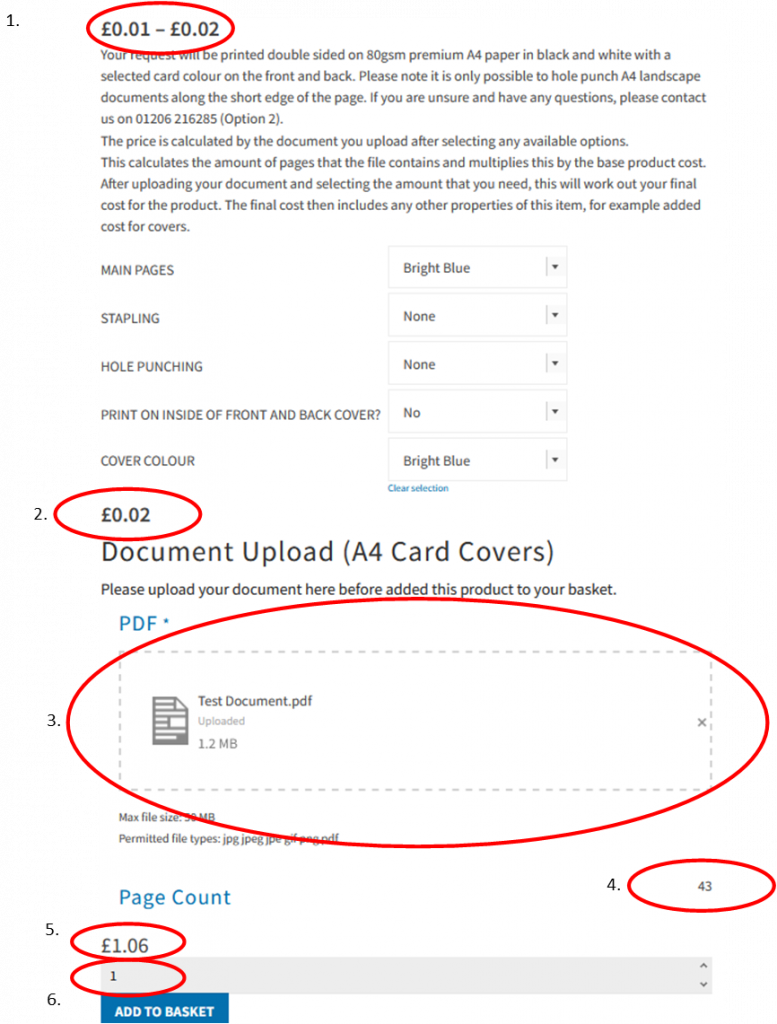
Taking the example below, we can look deeper into the sections:
1 – Variable cost – This shows the minimum and maximum costs of the product. This cost is usually the per side cost of the document.
2 – Cost of item (Per side) – This shows the cost, per side, of the options you have selected, you can go back and change the options around to see the different prices. As a general rule, white paper will always be the cheapest to print on!
3. – Document upload – This is the box where you can either drag and drop, or click to upload, your PDF document. We normally only accept PDF documents as it is a widely used format and easy for us to work with.
4 – Page Count – This is the number of pages in your document that you have uploaded. This will work in conjunction with item 2 in this list to work out a cost.
5 – Grand Total – This field is the final cost of the product and the variations your have selected. This total will add on any other costs required with the product, such as wire binding, card covers ect.
6 – Number of Products – This is the number of copies that you need. You will see the Grand Total will increase or decrease when you adjust this number.